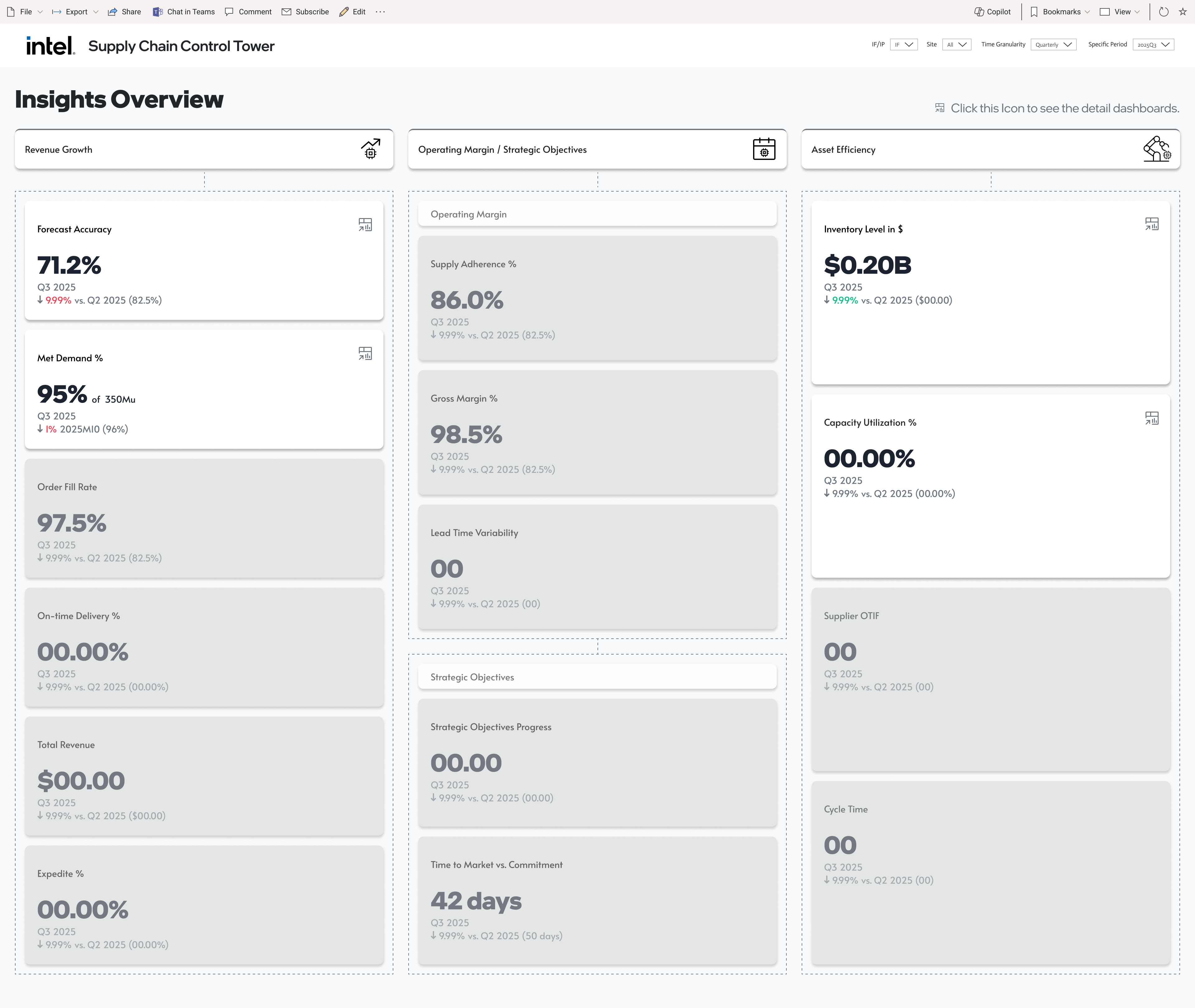
A control tower for a Fortune-100 semiconductor manufacturer — one landing page, three strategic lenses, sixteen executive-grade KPIs — authored as four paradigmatic templates the rest of the engagement scaled.
The client knew they needed an exec control tower. They did not know — yet — what the dashboards should show, what decisions the KPIs informed, or how each team would consume them. The brief was a spreadsheet of metric labels.
When the brief is ambiguous, the instinct is to push for more discovery — more workshops, more interviews, more decks. On this engagement, exec bandwidth didn't allow it, and honestly, another round of workshops wouldn't have produced a spec either.
We inverted the order. Rather than waiting to know what to build, we built paradigmatic prototypes with dummy data for four representative KPIs, then put the prototype in front of the executive sponsor. Within a single review, the pixels surfaced every hidden assumption — what "accuracy" should compare against, whether "met demand" meant units or dollars, which time-windows mattered. The prototype was the requirements document.
With exec sign-off on the four templates, data scientists had an exact spec to source against — no wasted ETL, no rejected framings. The team filled in the remaining roster by applying the same four patterns. Design didn't follow strategy; design unlocked it.
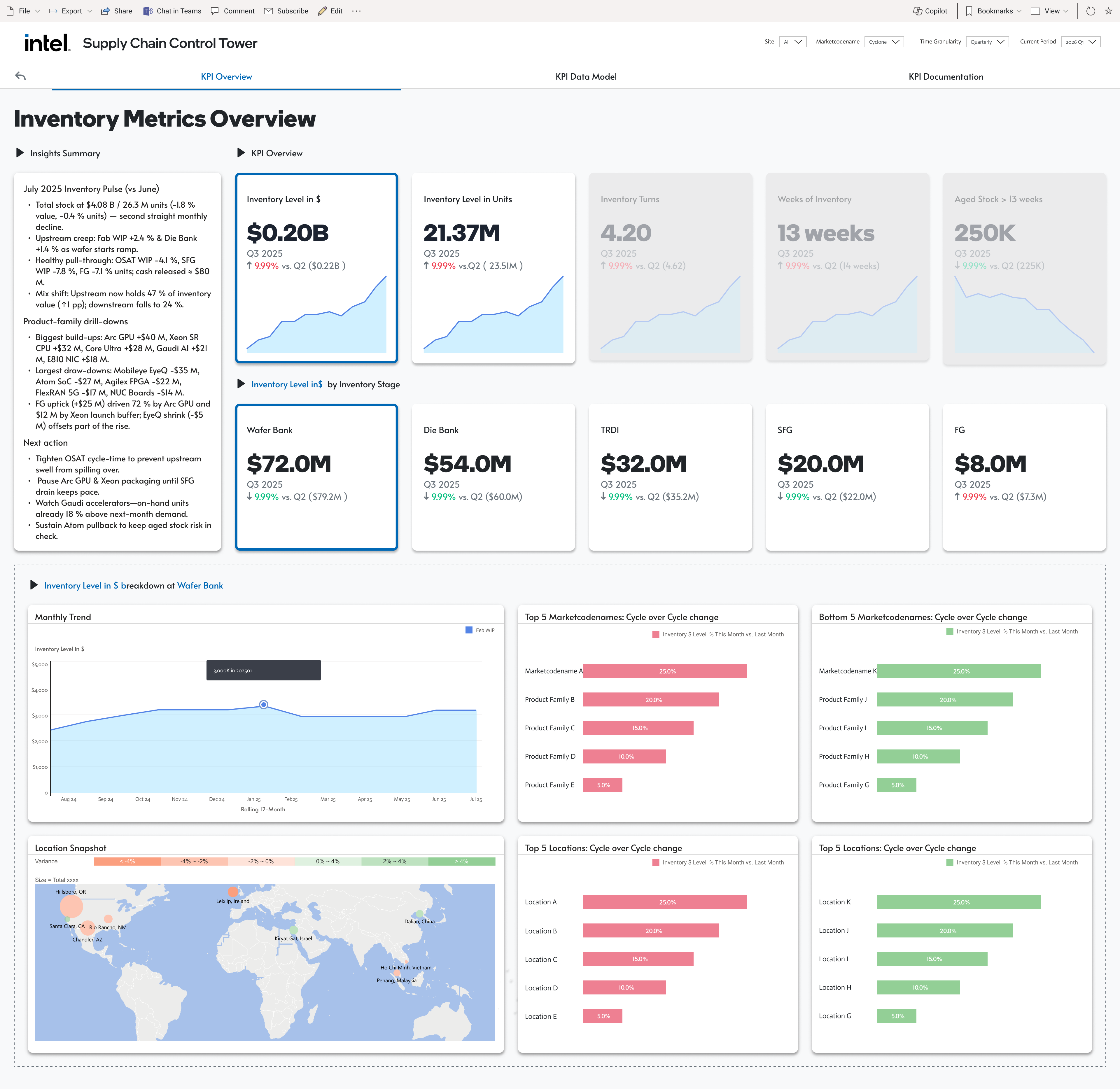
The control tower is a three-level hierarchy. The exec sees the full scoreboard on one landing page. A click on any KPI opens a dedicated KPI Overview — headline tiles, trend, breakdown, outliers. Two sibling tabs carry the Data Model and Documentation, so anyone downstream can trace a number to its source. Consistency across every KPI means the exec learns the grammar once.

I designed four paradigmatic KPIs end-to-end — headline framing, drill-down logic, and internal data structure. Each one carries a stated executive question and a stated design decision, so the team that scaled the pattern onto the rest of the roster had the reasoning, not just the layout.
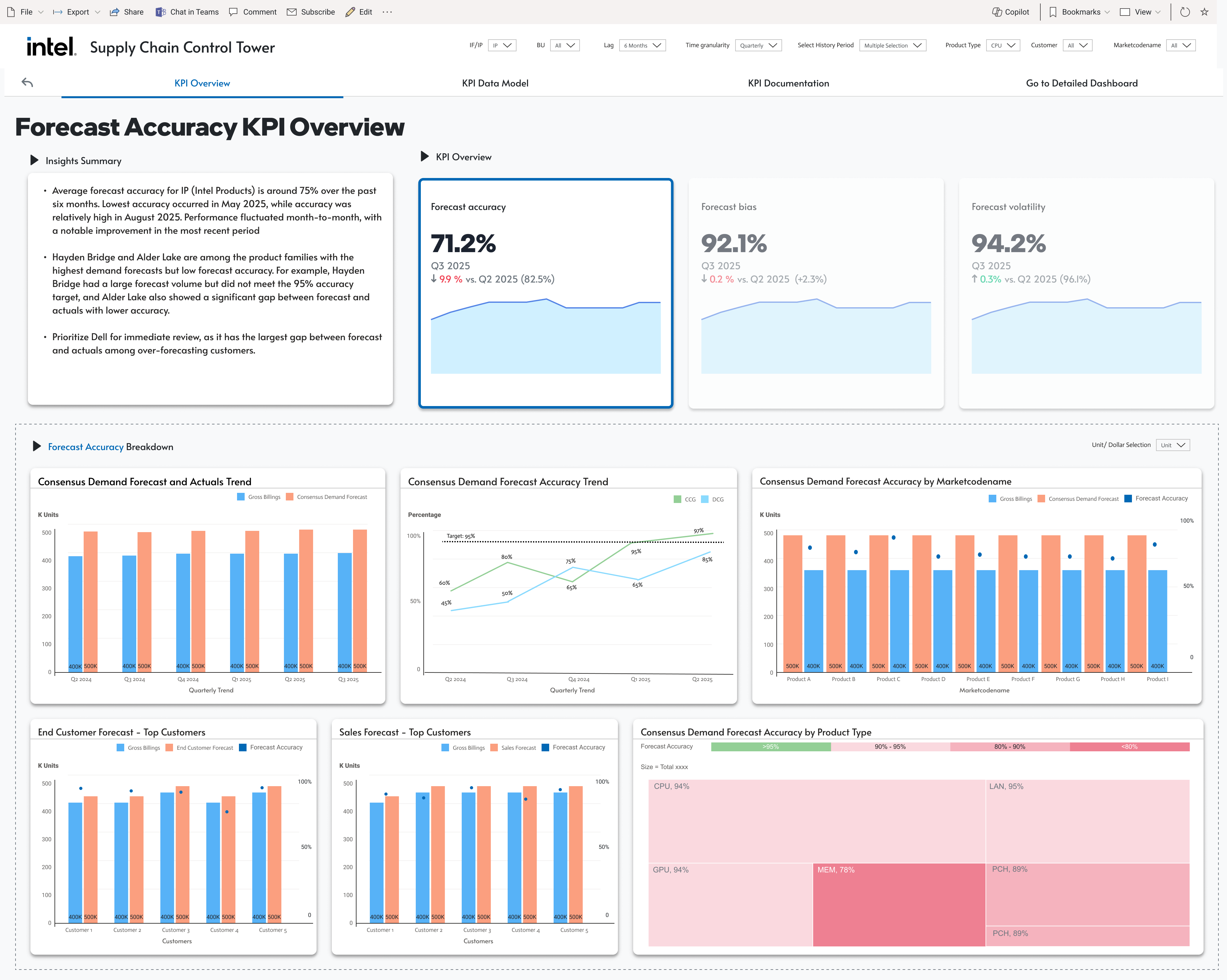
Split accuracy from bias from volatility on the same tile row. A single accuracy % masks whether the error is systematic (bias) or stochastic (volatility) — different root causes, different remediation. The drill-down breaks accuracy by market-sub-segment and product type so the planner can see where the forecast is breaking, not just that it is.

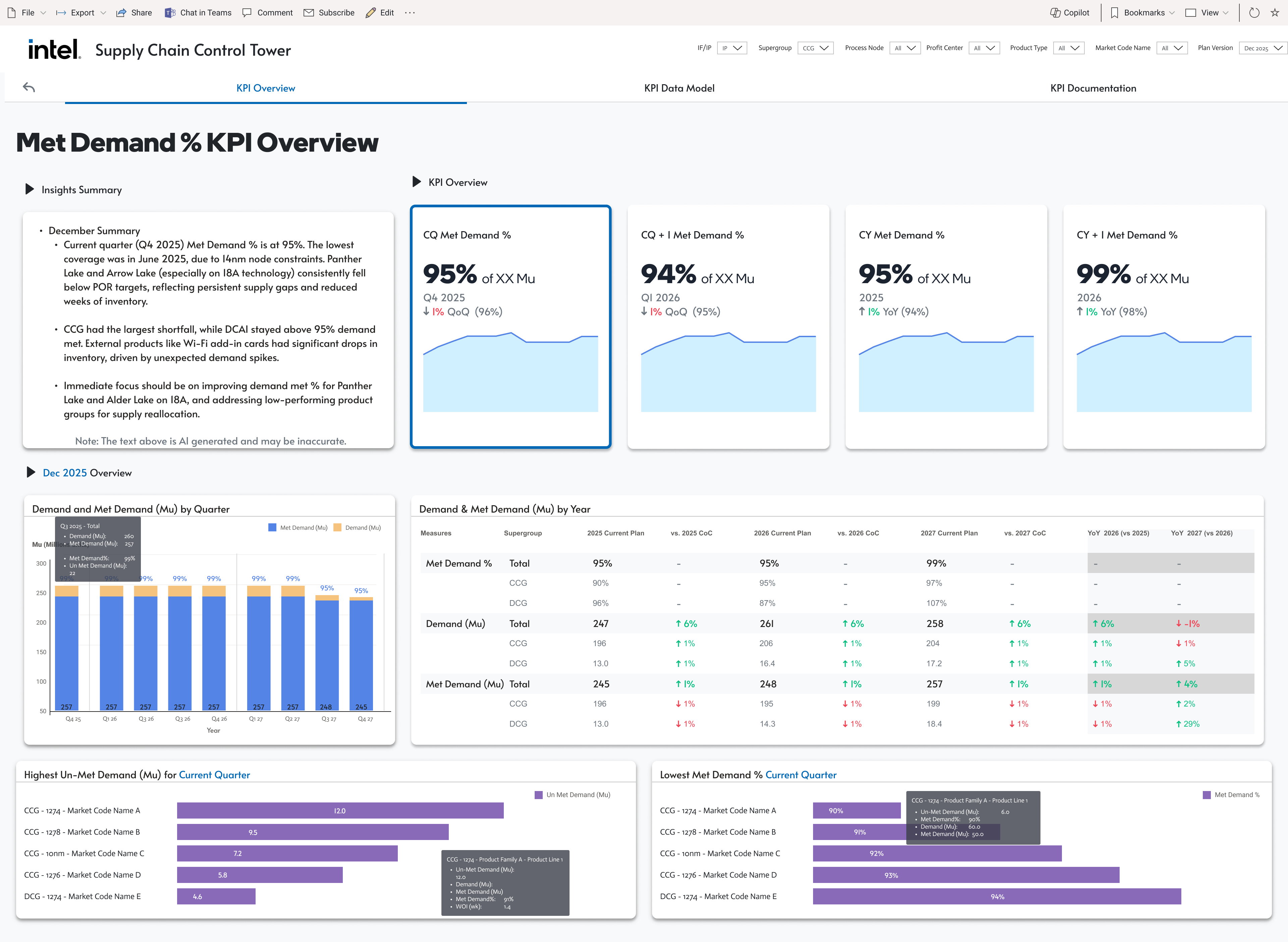
Four tiles side by side — CQ, CQ-1, CY, CY-1 — because a single Met Demand % tells an exec nothing without context. The four-way framing puts the quarter-over-quarter swing (am I trending down right now?) and the year-over-year comparison (versus the same period last year) in the same eye-line. The drill-down exposes the highest un-met demand markets and the lowest-performing nodes so operations knows which products to push, not just that we missed.

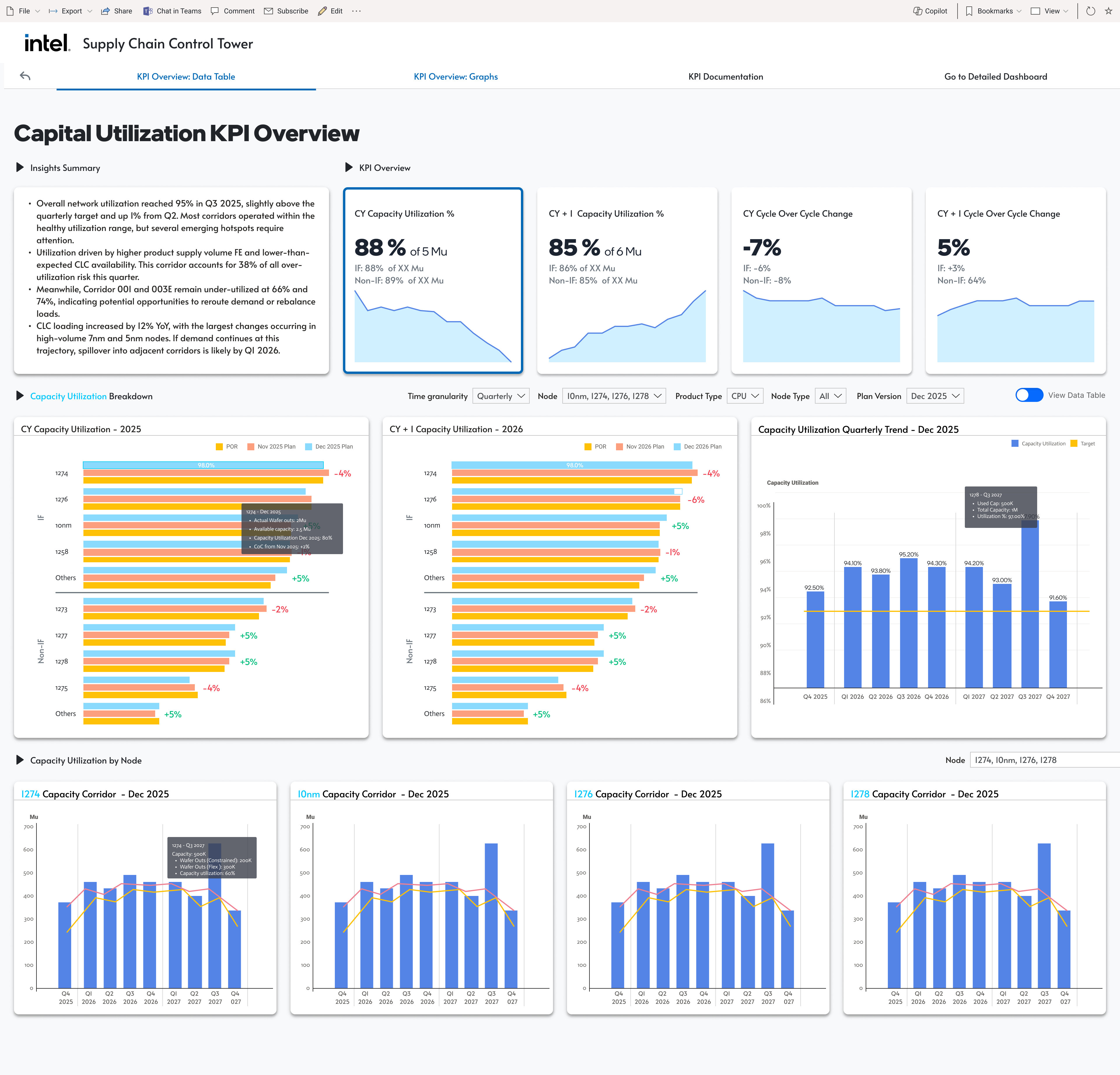
Separate state from dynamics on the same tile row: CY and CY-1 capacity utilization on the left, CY and CY-1 cycle-over-cycle change on the right. Execs and operators ask different questions of the same number — exec wants "where are we now," operator wants "is it changing fast." Same source, two lenses, zero dashboard duplication. The drill-down is a node-level data table with color-coded deltas so the planner can pinpoint the specific fabs trending outside the capacity corridor.

Dual lens by design — Dollars for finance and strategy, Units for ops and planning — on one dashboard as tabs, not two separate reports. Finance and ops literally look at the same source when they argue about it. The stage-of-manufacturing breakdown (Wafer Bank → Die Bank → TKDI → SFG → FG) is the real insight: it's not "how much inventory," it's "at what stage of the flow is it getting stuck." Location snapshots + highest/lowest cycle-change callouts turn the insight into a next action.

The four KPI templates weren't four deliverables — they were a grammar. Headline tile row, by-period trend, by-segment breakdown, outlier callouts, and a consistent Overview / Data Model / Documentation tab structure. Once the grammar was in place and exec-approved, every additional KPI in the roster was a fill-in-the-blanks exercise.
The rest of the engagement scaled on that pattern: twelve-plus KPI dashboards authored by the team against my templates, plus Data Model and Documentation pages per KPI. The SME deliverable was never 16 dashboards. It was a method the team could execute against.